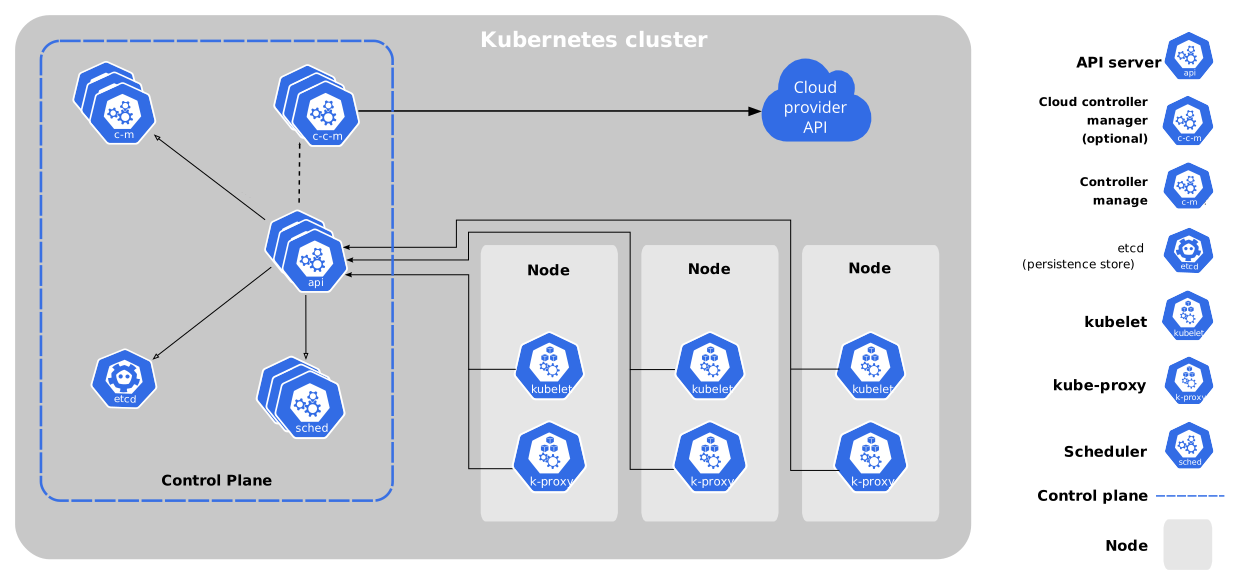
Definition:
Container orchestration engine by:
Automating deployment, scaling, and management of containerized applications.
Docs and Ref Why?
manage multiple hosts container orchestration
auto-scaling
load-balancing
self-healing
rolling updates and rollbacks
context = user + cluster + namespace
v1.34
A. Documentations v1.34
B. Getting started
1. Learning environment
2. Prod environment:
3. Best practices
C. Concepts:
1. Overview:
Components:
The Kubernetes API:
2. Cluster Architecture:
.
3. Containers:
4. Workloads:
2. Workload API
3. Workload management:
4. Managing workloads
5. Autoscaling workloads
Scaling workload manually
Scaling workload automatically
Scaling cluster infrastructure
5. Service, load balancing and networking:
0
The Kubernetes network model ***
each pod in a cluster gets its own cluster-wide unique IP address
containers in a pod are in same namespace, communicated with eachother over localhost
The pod network (cluster network) handles communication between pods, ensure that
all pods can communicate with all other pods, same or different node, without proxy or NAT
agents on a node (system daemons, or kubelet daemon ) can communicate with all pods on that node
Kubernetes Service API create a long-lived IP or hostname for a service implemented by one or more backend pods
K8s Gateway API allows you to make services accessible to clients that are outside the clusterK8s Network Policy is a built-in Kubernetes API that allows you to control traffic between pods, or between pods and the outside world.
…
Service ClusterIP allocation
6. Storage:
7. Configuration
ConfigMaps
Secrets
Liveness, Readiness, and Startup Probes
requests and limits :
request is a way to ensure that the pod/container always have enough resource
if sum requests are equal to the node cpu/mem, no other pod/container can be scheduled onto it
if a node has enough resource, a container can have more than its request
when cpu limit hits, a container will be throttled by the kernel to the right limit
when mem limit hits, a container might be killed by linux kernel with OOM
resource types:
For Linux workloads, you can specify huge page resources. Huge pages are a Linux-specific feature where the node kernel allocates blocks of memory that are much larger than the default page size.
types:
cpu
mem
ephemeral-storage
nvidia.com/gpu : 17. Schedule GPUs
hugepages-2Mi
other device
Resource requests and limits of Pod and container:
can be applied for both pod and individual containers
Pod-level resource specification
resource units in kubernetes:
CPU resource unit:
1 physical core if not Hyperthreading , otherwise 1 thread
1m is 1 milisecond, 1 is 1 full second of cpu
memory:
measured in bytes
E, P, T, G, M, k or use the power-of-two equivalents: Ei, Pi, Ti, Gi, Mi, Ki
128974848, 129e6, 129M, 128974848000m, 123Mi are the same
Container resources example
Pod resources example
…
Local ephemeral storage:
To make the resource quota work on ephemeral-storage, two things need to be done:
admin sets resource quota for ephemeral-storage in a namespace
a user needs to specify limits for the ephemeral-storage resource in the pod spec
configurations for local ephemeral storage
setting requests and limits for local ephemeral storage:
spec.containers[].resources.limits.ephemeral-storagespec.containers[].resources.requests.ephemeral-storage
How Pods with ephemeral-storage requests are scheduled
each node has a maximum amount of local ephemeral storage it can provide for pods, Node Allocatable
Ephemeral storage consumption management
Extended resources:
8. Security
9. Policies
10. Scheduling, preemption and eviction
Assigning pods to Nodes
Node Label nodeSelector
strict placement → atleast 1 node must match every labels for it to be scheduled
Affinity and anti-affinity
Node Affinity
inter-pod affinity and anti-affinity:
Types of Inter-pod Affinity and Anti-affinity
Scheduling behavior:
hard constraints: node filtering
podAffinity.requiredDuringSchedulingIgnoredDuringExecution and podAntiAffinity.requiredDuringSchedulingIgnoredDuringExecution
Scheduling a Group of Pods with Inter-pod Affinity to Themselves
nodeNamenominatedNodeNamePod topology spread constraints
Operators
Pod overhead
Concept:
A Taint is applied to a node to indicate that it should not accept certain pods unless they explicitly tolerate it.
A taint repels all pods that do not have a matching toleration
adding nodeName to a pod will bypass scheduler
if the node also has NoExecute taint set, the kubelet will eject the pod if it doesnt have right tolerant
allowed value for effect:
NoExecute:
pods that do not tolerate are evicted immediately
pods that telerate will remaind for tolerationSeconds if set, otherwise forever
NoSchedule:
running pods say running, no new pod without toleration
PreferNoSchedule:
Control plane will try to avoid if there is other node
Multiple taints and tolerations can be added…
uses cases:
Dedicated node: can be set so that a node can only be used by a user or group (Admission Control )
Nodes with special hardware: …
Tainted-based eviction
Tainted based eviction:
Taintnodes by condition
11. Cluster administration: ***
.
.
Node provisioning
Autoscaler
.
Cluster networking
…
Metrics for Kubernetes system component
Metrics in kubernetes:
In most cases metrics are available on /metrics endpoint of the HTTP server.
kubelet daemon exposes metrics in /metrics/cadvisor, /metrics/resource and /metrics/probes endpoints as kubernetes Metrics Server
12. Windows in kubernetes
13. Extending kubernetes
D. Tasks:
2. Administer a cluster
Adminster a cluster with kubeadm
…
Resource compute resources for system daemons:
Node Allocatable
…
4. Troubleshooting clusters
Resource metrics pipeline
6.
8. Run applications:
Run a stateless application using a deployment
…
9. Run jobs
17. Schedule GPUs
E. Tutorials
F. Reference
Kubernetes API
Workload resources
written in each object’s API section
…
Common definition:
Instrumentation
CRI pods & container metrics
with PodAndContainerStatsFromCRI enabled, kubelet daemon polls container runtime for pod and container stats using cAdvisor
API access control
Admission Control
Networking reference